How to Remove SIM Card from iPhone Safely
Removing a SIM card from an iPhone sounds like a five-second job. Usually, it is. But in 2026, the answer is not quite as simple as “find the hole and push.”
Apple has been moving the iPhone toward eSIM, while many travelers still use physical nano-SIM cards for cheaper data, local numbers, or backup connectivity.
Check the tray first
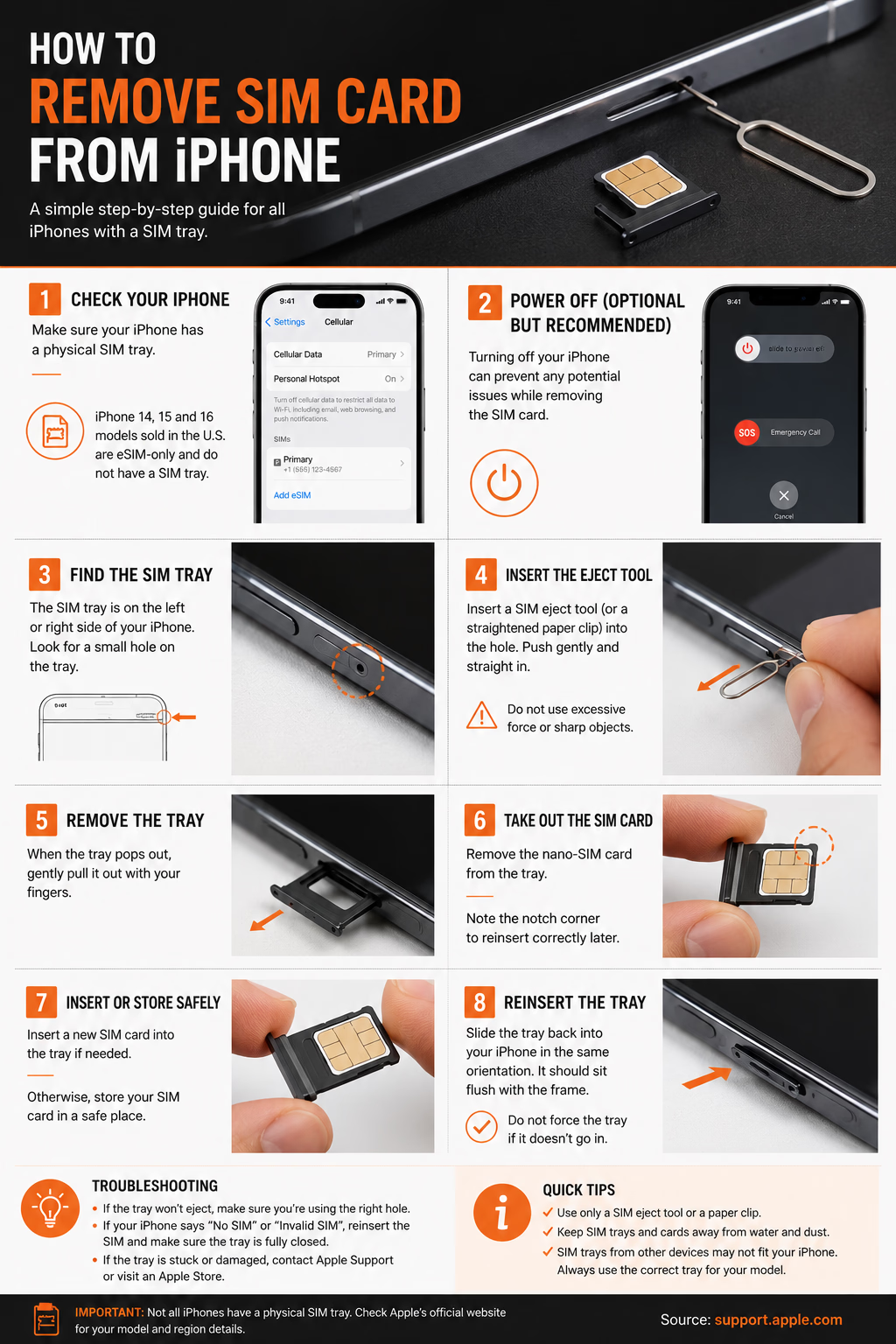
Before you look for a tool, look for the tray. Most iPhones with a physical SIM slot have a small tray on the side. Apple says to insert a SIM eject tool or paper clip into the small hole beside the tray, push inward toward the iPhone, and avoid forcing it. If it will not eject, Apple recommends going to a carrier or Apple Store.
There is one catch: not every iPhone has a physical SIM tray anymore. Apple’s model guidance says U.S. iPhone 14, iPhone 15, and iPhone 16 models are eSIM-only. Apple also notes that iPhone 13 models and later support Dual eSIM, while iPhone 13 models and earlier may still have a nano-SIM tray depending on model and region.
That is why travelers get confused. Two people can own the same iPhone generation, but the one bought in Europe may have a SIM tray while the one bought in the United States may not.
Remove it carefully
Turn off the iPhone if you want to be extra cautious. It avoids the phone trying to read the SIM while you are handling it.
Find the SIM tray. It usually sits on the left or right side, depending on the model. Look for a narrow oval outline with a tiny circular hole.
Use the SIM eject tool that came in the iPhone box. No tool? A straightened paper clip usually works. Avoid needles, safety pins, earrings, or anything too sharp or bendy. The goal is firm pressure, not stabbing.
Insert the tool straight into the hole and push gently toward the phone. Do not angle it. When the mechanism releases, the tray will pop out slightly.
READ MORE: iPhone eSIM Explained
Pull the tray out with your fingers. Remove the nano-SIM card carefully and avoid touching the gold contacts. If you are inserting another SIM, match the notched corner with the tray shape. The card should sit flat. If it rocks or sits above the tray edge, it is not seated correctly.
Slide the tray back in the same orientation. It should close cleanly and sit flush with the frame. Apple warns that SIM trays from other iPhone models, iPads, or other phones may not fit properly, so do not mix trays even if they look similar.
If it refuses to open
This is where people damage phones. If the tray does not move, pause. A stuck tray can mean the tool is not aligned, the SIM is badly seated, or there is physical damage around the slot. More pressure is rarely the clever answer.
Also check that you are pushing into the SIM tray hole, not a microphone hole. The SIM tray hole is part of the tray outline. A microphone hole is not.
If your iPhone says “No SIM” or “Invalid SIM,” Apple suggests removing the SIM, putting it back into the tray, and making sure the tray closes fully. That simple reseat fixes more cases than people expect.
Why travelers still care
For years, the physical SIM was the traveler’s escape hatch. Land, buy a local SIM, avoid roaming shock, move on. eSIM has changed that rhythm. Now the smarter move is often to install a travel eSIM before departure and keep your main number active for calls, banking codes, and WhatsApp.
READ MORE: Why iPhone eSIM Is the Smartest Travel Shift in Years
But physical SIMs are not dead everywhere. Local prepaid SIMs still matter where eSIM support is patchy, ID registration is required, or local plans are much cheaper. Samsung, Google Pixel, and many Android brands still sell a mix of physical SIM, dual SIM, and eSIM models depending on the market. Apple is pushing the industry harder toward eSIM, but the world is moving at different speeds.
Conclusion
Removing a SIM card from an iPhone is easy. Understanding whether you should still need to do it is the real story.
The physical SIM tray is becoming less central, especially on newer U.S. iPhones, but it remains useful for travelers, expats, backup connectivity, and countries where eSIM adoption is uneven. The trend is clear: Apple wants connectivity to become software, not plastic. Travel eSIM providers benefit from that shift, carriers are adapting, and users are somewhere in the middle.
So keep a SIM eject tool in your travel pouch, but also learn how eSIM works on your iPhone. The best traveler in 2026 is not loyal to one format. They use whichever option gets them online faster, cheaper, and with less drama.