Does using eSIM drain battery faster?
Does using an eSIM drain battery faster?
Usually, no. The eSIM itself is not the battery problem. An eSIM is not some hungry little software monster sitting inside your phone eating power. It is a digital SIM profile stored on your device, replacing the removable plastic SIM card with remote provisioning. The GSMA describes eSIM as a global specification that enables remote SIM provisioning for mobile devices, while Samsung explains it simply as a digital SIM that lets you use mobile data without a physical SIM card.
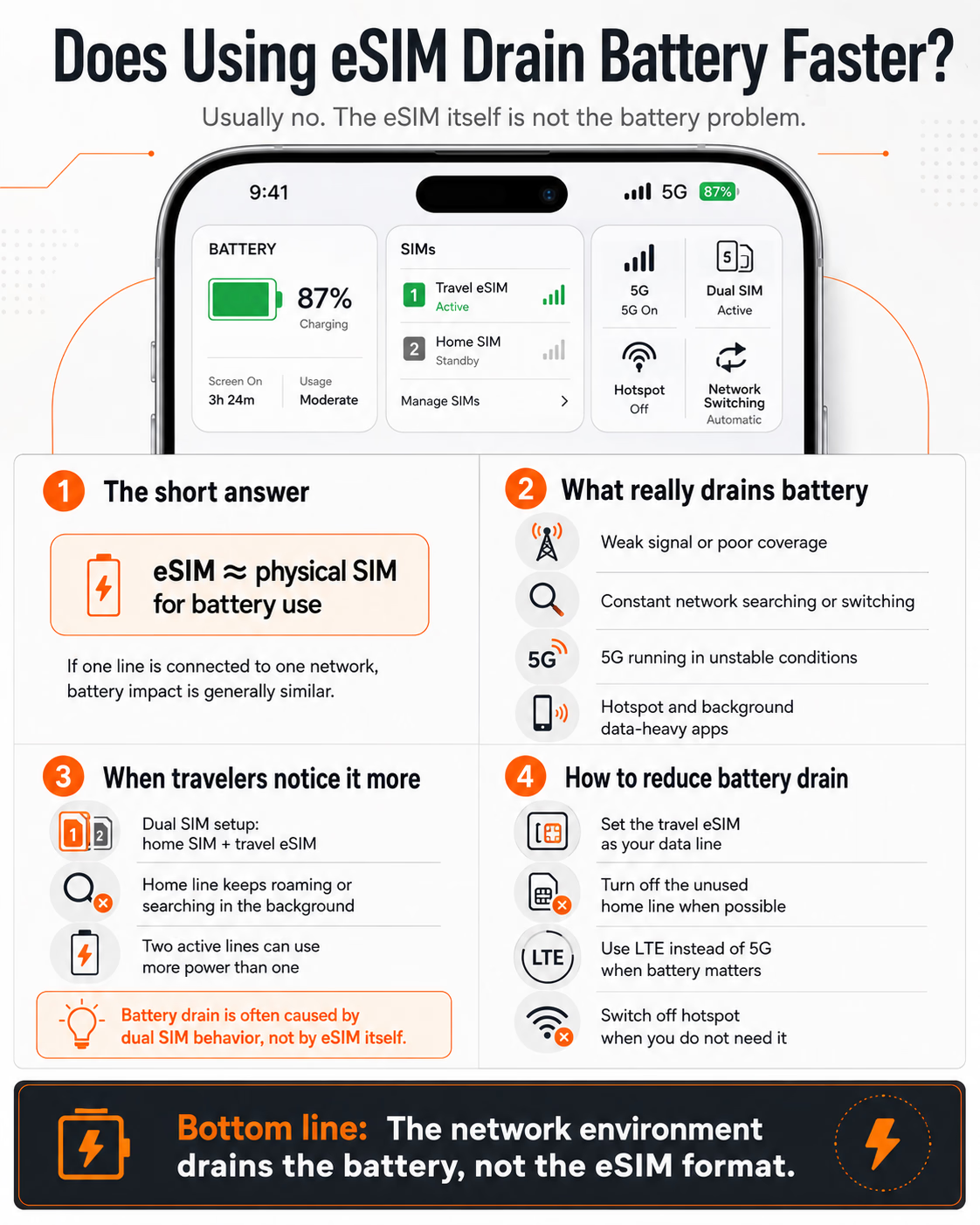
So if you compare one physical SIM connected to one mobile network with one eSIM connected to one mobile network, battery use should be broadly similar. The phone still has to do the same hard work: connect to the radio network, manage signal strength, switch cells, use 4G or 5G, run apps in the background, and keep data flowing.
The battery issue starts when travelers confuse “using an eSIM” with “using two mobile lines at the same time.”
That is where things get more interesting.
What actually drains the battery
Most battery drain comes from the mobile radio, not the SIM format.
When your phone has weak signal, jumps between networks, searches for coverage, or keeps switching between 4G and 5G, it works harder. That takes power. Google’s Pixel support guidance around battery drain points users toward battery optimization, adaptive battery, software updates, and mobile network behavior rather than blaming SIM format itself. Pixel community support threads also frequently point to weak or unstable mobile signal and band switching as common causes of higher “Mobile Network” battery use.
Travel makes this worse because your phone is suddenly doing more network negotiation than it does at home. It may be roaming. It may be choosing between partner networks. It may be in a hotel room with poor indoor coverage. It may be on 5G in one street and LTE in the next. None of this is caused by the eSIM being digital. It is caused by the phone trying to stay connected.
And yes, if you are walking through Tokyo, London, Dubai, or New York with Google Maps open, WhatsApp running, email syncing, translation apps ready, Instagram uploading, and hotspot turned on for your laptop, your battery will suffer. But again, that is travel data usage, not eSIM magic.

Dual SIM is the real suspect
Here is the setup many travelers use:
They keep their home SIM active for calls, SMS, banking codes, iMessage, WhatsApp identity, or Wi-Fi Calling. Then they add a travel eSIM for local or regional data.
Very convenient. Also, potentially worse for the battery.
Apple supports Dual SIM on iPhone using a physical SIM and an eSIM, or on newer models two eSIMs, depending on the device. That is great for travelers because it allows one line for your home number and another for data abroad.
READ MORE: How to Choose the Right eSIM as a Traveler in 2026
But two active lines can mean two network connections to manage. If your home SIM is active abroad but has no roaming access, weak roaming access, or keeps searching for a network, your phone may spend extra energy trying to maintain that line. This is why some travelers notice battery drain after “adding an eSIM,” when the more accurate explanation is: they started using dual SIM in a complicated roaming environment.
Ubigi, one of the travel eSIM providers, explains this clearly in its own support material: the eSIM itself does not consume more battery than a physical SIM, but being connected to two networks uses more energy than being connected to one. It also notes that hotspot use drains battery naturally faster.
That is probably the most honest answer travelers need.
When eSIM feels worse
eSIM can feel like it drains battery faster in a few common situations.
First, when the travel eSIM connects to a weak partner network. Some eSIM providers use multiple carrier partners in a destination. That can be excellent when the profile steers you toward a strong local network. It can be annoying when the phone keeps trying to settle on one.
Second, when 5G is left on all day. 5G can be brilliant, especially in dense cities and airports, but it can also use more power depending on the device, signal quality, and network conditions. For many travelers, LTE is more than enough for maps, messaging, browsing, tickets, payments, and light video.
READ MORE: iPhone Dual SIM: Two Lines that Matter
Third, when your home SIM stays active only for SMS or calls but has poor roaming behavior. This is the sneaky one. You think the travel eSIM is the new thing, so you blame it. Meanwhile, the old home line is quietly searching, reconnecting, and trying to stay alive in the background.
Fourth, hotspot. This one needs no mystery. Sharing your eSIM data with a laptop, tablet, or another person is useful, but it turns your phone into a small router. That will hit the battery hard.
Practical settings that help
The best travel setup is not always “turn everything on and hope.”
If you only need your home number for occasional SMS, consider turning off that line when you do not need it. On iPhone and Android, you can usually choose which SIM handles mobile data, calls, and messages. Apple’s Dual SIM settings allow users to label lines and decide how each line is used.
Use LTE instead of 5G when battery matters more than speed. This is especially sensible for sightseeing days, long airport transfers, conferences, or train journeys where charging is not convenient.
Turn off data roaming on the line you do not want using data. Make sure your travel eSIM is the selected data line. This avoids accidental roaming and reduces confusion.
Avoid leaving hotspot on casually. Use it when needed, then turn it off.
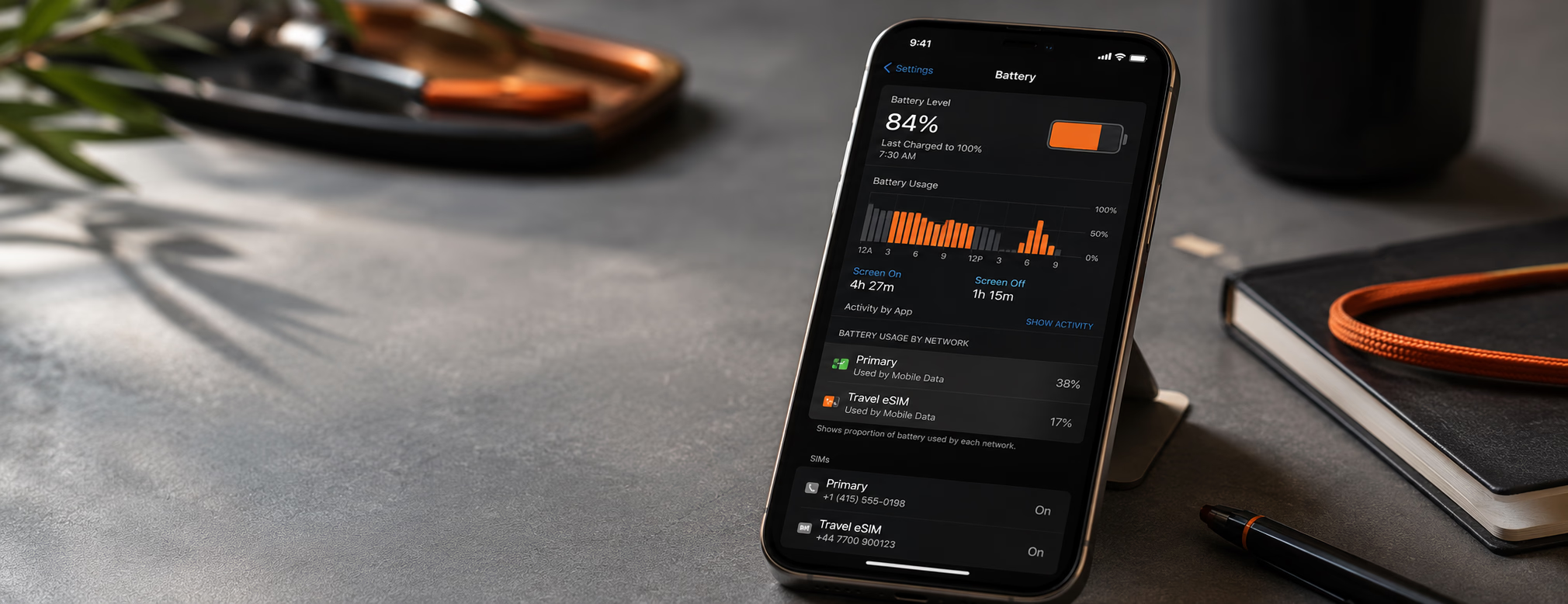
And before blaming the eSIM provider, check the battery settings. If “Mobile Network” or “Cellular” is high, the issue may be signal quality, network switching, dual SIM behavior, or 5G. If Instagram, Maps, TikTok, or camera backup is high, the eSIM is just the pipe. Your apps are doing the drinking.
What this means for eSIM providers
This is also a messaging problem for the eSIM industry.
Many travel eSIM brands sell simplicity: scan, install, connect. Fair enough. But battery life is one of those practical travel concerns people notice immediately. If a customer lands abroad, activates an eSIM, and their battery drops faster than usual, they may blame the provider, even when the real reason is dual SIM, weak signal, 5G, or hotspot.
The smarter providers should explain this more openly. Not with defensive FAQ language, but with useful setup advice: when to disable the home line, when LTE is enough, how to set the travel eSIM as the data line, and why hotspot changes the battery equation.
That kind of guidance builds trust. It also reduces support tickets.
The real conclusion
The eSIM is not the villain. The network environment is.
A physical SIM and an eSIM are just different ways of identifying your subscription to a mobile network. The battery drain comes from what your phone does after that: searching, roaming, switching, using 5G, maintaining two lines, and feeding data-hungry apps.
So the better question is not “Does eSIM drain battery faster?” It is “What setup am I using while traveling?”
One eSIM, one strong network, LTE when needed, hotspot off, and unused lines disabled? You should be fine.
Two active lines, weak roaming on the home SIM, 5G hunting indoors, and hotspot running from morning to night? Yes, your battery will complain.
For travelers, this is good news. It means the fix is usually not avoiding eSIM. The fix is using it properly.