Optimizing Your Phone’s Roaming Settings to Avoid Bill Shock
Heading overseas with your phone? The cheapest roaming setting is still the one most travellers forget to check before boarding.
It sounds basic, almost too basic. But roaming bill shock rarely starts with one dramatic mistake. It usually starts quietly: an email app syncing attachments in the background, maps refreshing in the taxi queue, cloud photos backing up from the airport lounge, or a phone briefly connecting to a partner network before the traveller even notices.
That is why roaming settings matter. They are not glamorous travel tech, but they are the first line of defence between a normal trip and a very annoying bill.
The roaming switch still matters
Data roaming allows your phone to use a foreign mobile network when you are outside your home operator’s coverage. That is useful when you have an international plan, a roaming bundle, or an eSIM set up properly. Without one, it can be expensive.
Before travelling, check that data roaming is switched off for your home SIM unless you deliberately want to use it abroad.
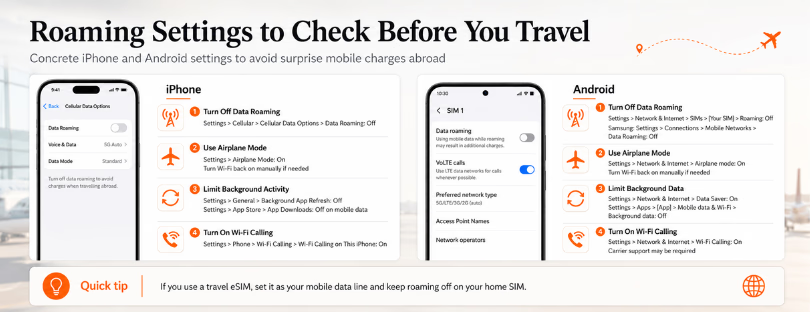
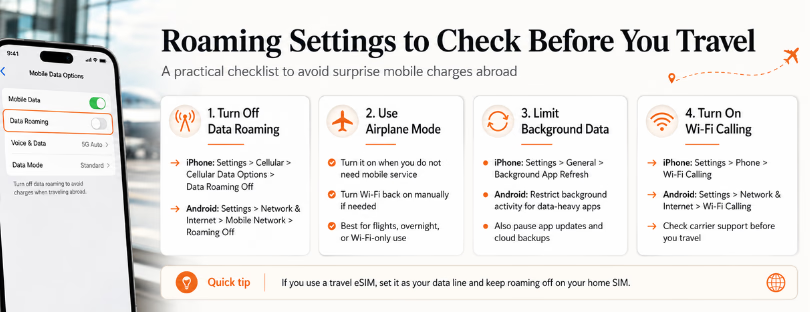
On iPhone, go to Settings > Cellular or Mobile Data > Cellular Data Options, then turn Data Roaming off.
On many Android phones, go to Settings > Network & Internet > SIMs or Mobile Network, choose your SIM, and turn Roaming off. On Samsung and some other Android devices, the route may be closer to Settings > Connections > Mobile Networks > Data Roaming.
The exact wording changes by phone brand and software version, which is part of the problem. Travellers often think they have disabled roaming, only to discover they changed the wrong SIM, especially on dual-SIM phones.
A better habit is to check the SIM-level settings, not just the general mobile data menu. If you use your home SIM for calls and an eSIM for data, make sure mobile data is assigned to the travel eSIM and data roaming is disabled on the home line.
Airplane mode is not a strategy
Airplane mode is useful, but it is a blunt instrument. It turns off cellular, Wi-Fi and Bluetooth until you manually re-enable what you need. For a nervous traveller, it can feel safe. For a business traveller waiting for bank verification codes, airline updates, hotel messages or work calls, it can become inconvenient very quickly.
The smarter version is selective control.
READ MORE: Does airplane mode use data overseas?
Turn on airplane mode when you truly want your phone offline, such as on a flight, overnight, or when using only hotel Wi-Fi. Then turn Wi-Fi back on manually if you need messaging apps, email, or Wi-Fi calling. But do not rely on airplane mode as your only protection. One accidental tap after landing can reconnect everything.
For longer trips, a travel eSIM, local SIM, or a confirmed roaming package is more realistic than trying to live in airplane mode for a week.
Background data is the silent bill builder
Roaming charges often come from things you never consciously opened. Cloud backups, app updates, autoplay video, email attachments and social apps can all use data in the background.
On iPhone, go to Settings > General > Background App Refresh and limit or switch off background refresh before travelling. Also check Settings > App Store and disable automatic downloads over mobile data.
On Android, open Settings > Apps, choose the apps most likely to use data, and restrict background data or battery activity where appropriate. You can also use Data Saver mode on many Android phones.
READ MORE: The Future Is Not Roaming vs eSIM. It Is Friction vs Frictionless
This is not perfect. Restricting background activity can delay notifications and make some apps feel less responsive. That trade-off is fine for Instagram, cloud photo backups or shopping apps. It is less ideal for messaging, banking, ride-hailing, airline, or work apps where timely alerts matter.
The practical approach is simple: restrict the noisy apps, protect the essential ones.
Wi-Fi calling helps, but read the small print
Wi-Fi calling lets supported phones make calls and send texts over Wi-Fi instead of the mobile network. It can be helpful in hotels, airports, apartments and conference venues where mobile signal is poor or roaming voice rates are high.
On iPhone, check Settings > Phone > Wi-Fi Calling. On Android, the setting is usually under Network & Internet, Connections, or the phone app settings, depending on the device and carrier.
But Wi-Fi calling is not magic. It must be supported by your carrier, activated before travel in some cases, and charged according to your operator’s rules. Some carriers treat Wi-Fi calls as domestic calls. Others apply conditions, especially when calling international numbers. Travellers should check this before assuming every call over Wi-Fi is free.
For many people, WhatsApp, FaceTime Audio, Signal, Teams or Google Meet will be simpler. The catch is that those apps still need data, so they work best on trusted Wi-Fi or a travel eSIM plan.
The better pre-flight checklist
The strongest roaming setup is not one setting. It is a stack.
Before departure, check your operator’s roaming rates for the destination. Turn off data roaming on your home SIM. Download offline maps. Disable automatic cloud backups and app updates over mobile data. Set a spend cap or usage alert if your carrier offers one. Then decide how you will actually connect abroad: roaming bundle, travel eSIM, local SIM, or Wi-Fi-only.
For short trips inside inclusive roaming zones, your normal plan may be enough. For cruise ships, remote islands, long-haul business trips, or countries outside your bundle, it usually is not. Cruise and maritime networks deserve special caution because they can sit outside standard roaming packages.
This is where the market has changed. Travellers no longer have to choose between expensive roaming and hunting for a local SIM kiosk after landing. eSIM providers such as Airalo, Yesim, Ubigi, Nomad eSIM, GigSky, Holafly and Saily have made destination data easier to buy before travel. Traditional operators have responded with day passes, bundles and spend alerts. None of these options is perfect, but the direction is clear: travellers want visibility before they want more megabytes.
Final thought
The old advice was “turn roaming off.” That is still good advice, but it is no longer enough.
Modern travel connectivity is about control. Apple, Google, Ofcom and the FCC all point travellers toward the same basic principle: understand what your phone is allowed to do before it connects abroad. The setting matters, but so does the plan behind it.
A travel eSIM is not necessary for everyone. If you are spending two days in a country covered by your mobile plan, adding another product may be overkill. But for frequent travellers, families, remote workers and anyone moving across several countries, the best protection is not fear of roaming. It is a clean setup: home SIM protected, data route chosen, apps under control, and costs visible before the trip starts.
That is the real upgrade. Not cheaper data for its own sake, but fewer surprises.