World Cup 2026 eSIM Guide: What Fans Must Check
The FIFA World Cup 2026 will not be a normal football trip. It will be a moving tournament across three countries, 16 host cities, long domestic flights, border crossings, packed stadium zones, and thousands of fans trying to open the same apps at the same time.
That makes connectivity less of a “nice extra” and more of a travel essential.
The tournament starts on 11 June 2026 in Mexico City and ends on 19 July 2026 in New York/New Jersey, according to FIFA’s official schedule announcement. FIFA has also confirmed that mobile tickets are delivered through the FWC2026 Mobile Tickets app, which is required to access and manage tickets. In other words, your phone is not just your map, camera and payment tool. It is also your stadium entry point.
So, before buying the first “World Cup eSIM” that appears in search, slow down. The best eSIM for this tournament is not necessarily the cheapest one. It is the one that works cleanly across your actual route.
Check the real coverage
Start with geography, not gigabytes.
World Cup 2026 is hosted by the USA, Canada and Mexico. Some fans will stay in one city. Others will follow a team from Mexico City to Houston, Toronto to New York, or Vancouver to Los Angeles. That changes the eSIM decision completely.
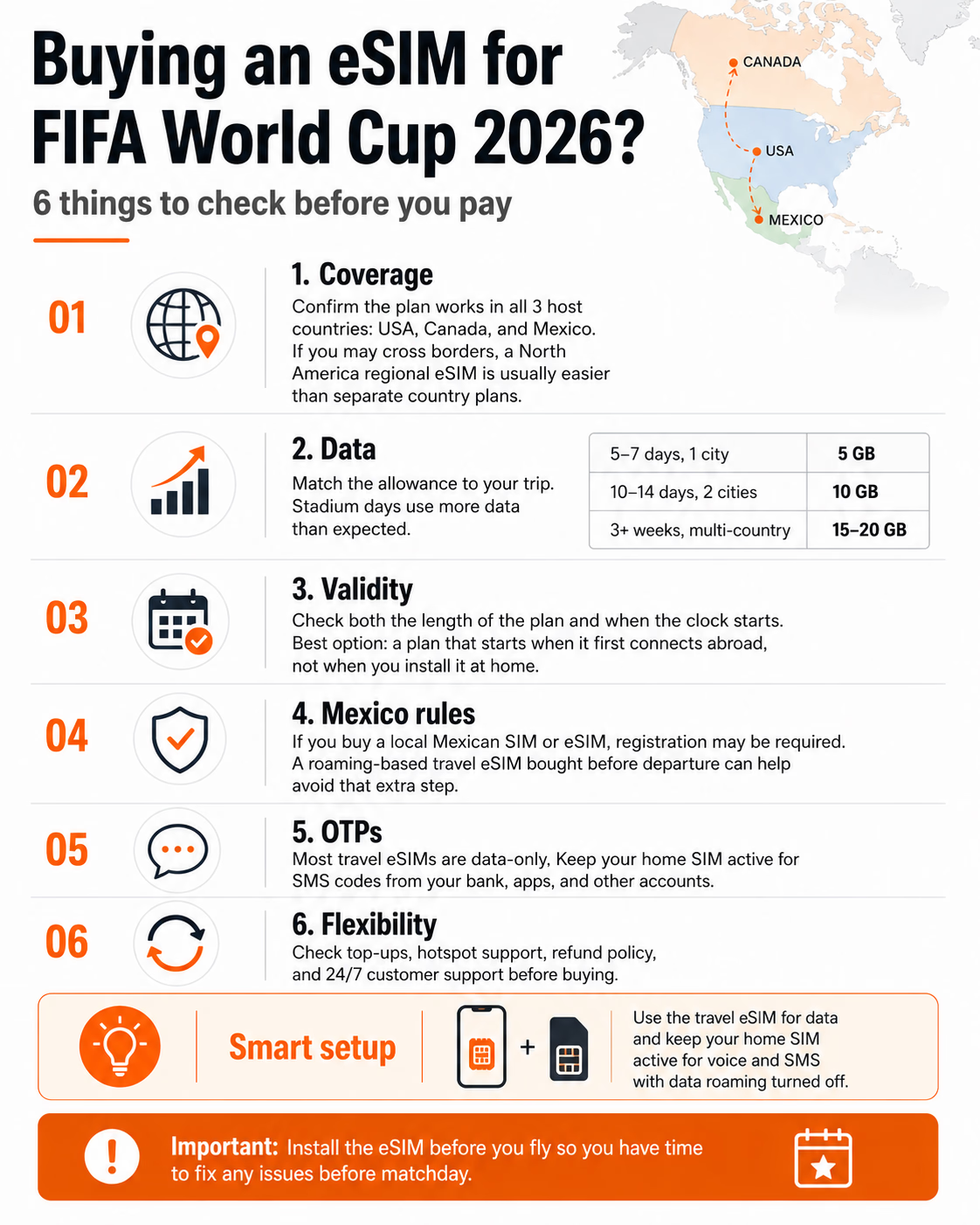
A single-country eSIM can be fine if your trip is limited to one destination. But if you plan to cross borders, a North America regional eSIM is usually simpler. One plan covering the USA, Canada and Mexico means fewer installations, fewer plan changes, and less risk of discovering at the airport that your “global” plan quietly excludes the country you just landed in.
READ MORE: ByteSim Launches North America eSIM for World Cup 2026
Still, do not trust vague wording. Look for all three countries named clearly on the provider page. “North America” sounds reassuring, but the details matter. Some travel eSIM providers, including players like Airalo, Holafly, Yesim, Nomad eSIM and GigSky, offer regional or multi-country options, but coverage, network partners, hotspot rules and fair-use policies can differ heavily between plans.
Match data to matchdays
Football trips are data-hungry in a very specific way.
A normal sightseeing day might involve maps, restaurant searches, WhatsApp, a few photos and rideshare apps. A stadium day adds mobile ticket access, security updates, live transport changes, group chats, video uploads, mobile payments and maybe a little panic-refreshing when everyone is trying to find the right gate.
As a practical starting point, 5 GB can work for a 5 to 7 day, one-city trip with moderate use. For 10 to 14 days and two cities, 10 GB is safer. For three weeks, multiple countries, heavy social posting or hotspot use, 15 to 20 GB is more realistic.
The mistake is not only under-buying. Over-buying also happens, especially when fans panic and choose a huge plan they will never use. The smarter move is to buy enough for the core trip, then choose a provider with easy top-ups inside the app. That matters more than a giant allowance you may waste.
Watch the validity clock
This is where many travellers lose value without noticing.
Every eSIM plan has a validity period, but the important question is when that period starts. Some plans begin when you install the eSIM profile. Others start when the eSIM first connects to a supported network abroad.
READ MORE: Need eSIM for 2026 World Cup in USA, Canada, Mexico..?
For World Cup travel, the second option is usually better. You can install the eSIM at home, check that the profile is visible on your phone, and still avoid burning paid days before departure.
Pick a validity window that covers the whole journey, not just the match dates. Add two or three extra days for delays, layovers, unexpected travel changes, or the very real possibility that you decide to chase one more match. World Cup travel has a funny way of expanding.
Understand Mexico’s registration rules
Mexico deserves special attention.
From 9 January 2026, new mobile lines in Mexico must be linked to an identified user, and existing unregistered lines face a 30 June 2026 deadline before suspension can apply. Telcel’s own registration page says new lines must be registered with official photo identification and CURP, while legal analysis from Hogan Lovells notes that passports are among the accepted ID documents for line linking.
For visitors, the practical difference is simple. If you buy a Mexican local SIM or local eSIM from a Mexican operator, you may need to complete a registration process, potentially with your passport. If you buy an international travel eSIM before departure and it connects through roaming arrangements, you generally avoid the local-line registration step.
That does not automatically make roaming-based travel eSIMs “better” for everyone. Local Mexican plans may still be attractive for longer stays. But for a short World Cup trip, removing one administrative step is valuable.
Keep your home number alive
Most travel eSIMs are data-only. That is perfectly fine for maps, apps, messaging and browsing. It is not enough if your bank, airline, FIFA account, hotel or government service sends a one-time password to your home number.
This is where a dual-SIM setup matters. Use the travel eSIM for mobile data. Keep your home SIM active for voice and SMS. Turn off data roaming on the home line so you do not accidentally trigger roaming charges.
READ MORE: T-Mobile Launches U.S. Travel eSIM for Visitors
The CRTC advises travellers to consider local SIMs or eSIMs to avoid roaming fees and to turn off data roaming when managing costs abroad. The same logic applies here: separate data from identity. Let the travel eSIM carry the internet. Let your home number handle OTPs.
Before flying, especially from prepaid markets in the Gulf, India or Southeast Asia, confirm that your home carrier allows international SMS reception. Usually it does. But “usually” is not what you want to discover outside a stadium.
Check the boring details
The final checks are not glamorous, but they decide whether the trip feels smooth.
Can you top up without reinstalling? Is hotspot allowed? Is 5G included where available, or only LTE? What happens if the eSIM fails to install on a supported device? Is support available 24/7, or only during office hours in another time zone?
Install the eSIM before you fly. Do not activate paid data early if the plan starts on the first network connection, but do install the profile. If something fails, you want to fix it from your sofa, not from a stadium queue with 80,000 people around you.
The real takeaway
World Cup 2026 will expose the difference between a cheap eSIM and a travel-ready eSIM.
For a normal weekend trip, almost any decent plan can work. For a tri-country tournament, the checklist changes. Coverage needs to match your route. Data needs to match stadium behaviour. Validity needs to match real travel, not just match dates. Mexico’s registration rules need to be understood before arrival. And your home number still matters because digital travel now runs on verification codes.
This is also where the wider eSIM market is heading. The winning providers will not just sell data. They will remove friction at the exact moment travellers cannot afford friction. For World Cup fans, that is the whole game.