Google Pay App Explained: Setup, Use & Travel Tips
For many travellers, “Google Pay app” still sounds like one simple thing: download the app, add a card, tap your phone, done. In reality, Google’s payment world has become slightly more layered.
Google Pay is now best understood as the payment system behind several everyday actions: paying online, checking out in apps, using saved payment details in Chrome, and tapping an Android phone at a contactless terminal. The app experience, however, is mostly handled through Google Wallet, especially for in-store payments and stored travel essentials such as boarding passes, tickets, loyalty cards and payment cards. Google’s own Pay site still presents Google Pay as the way to “pay with a tap,” “check out with a click,” and use saved payment details across Android and Chrome.
That distinction matters. In the United States, the standalone Google Pay app stopped being available from June 4, 2024, while in-store and online payments via Google Pay continued. Google now directs users to Google Wallet for tap-to-pay use.
So when people ask, “What is the Google Pay app?”, the honest answer is: it depends where you live. The payment brand is Google Pay. The everyday app you are most likely using on Android is Google Wallet.
What Google Pay actually does
Google Pay lets users pay without repeatedly entering card details or carrying a physical card for every transaction. It works in three main situations.
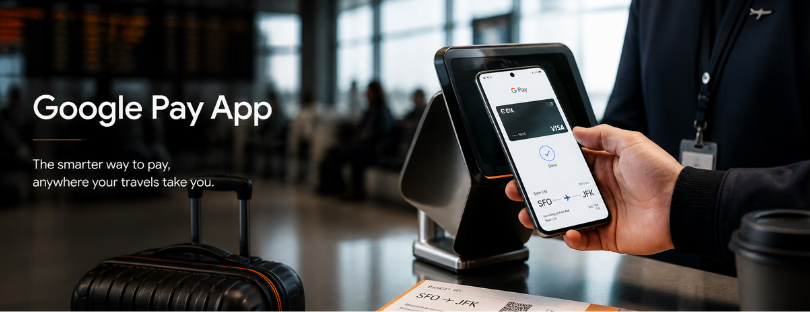
First, there is tap to pay. Add a supported debit or credit card to Google Wallet, unlock your Android phone, hold it near the payment terminal, and wait for the confirmation. Google’s help pages are clear on one useful detail: you usually do not need to open the Wallet app before paying. You turn on and unlock the phone, hold the back of the device near the reader, and follow any PIN or signature prompt if needed.
Second, there is online and in-app checkout. When you see a Google Pay button at checkout, you can pay using payment details already saved to your Google Account. This is where Google Pay behaves less like a “wallet app” and more like a fast checkout layer.
Third, there is autofill. Google says payment details saved once can appear at checkout on Android and Chrome. For frequent travellers booking flights, hotels, airport transfers and eSIM plans on the move, this is often the most underrated part. It removes the clumsy moment of typing a card number into a hotel Wi-Fi page at midnight.
How to set it up
The setup is simple, but there are a few checks behind the scenes.
On Android, open the Google Wallet app, tap Add to Wallet, choose Payment card, then add a new credit or debit card. You can scan the card with the camera or enter details manually. After that, Google and the card issuer may ask you to verify the card before it can be used for contactless payments.
Once a card is added, users can choose a default payment card. That default card is the one charged when you tap your phone at a terminal, unless you select another card before paying. Google also allows cards to be added from some bank apps or issuer websites through an “Add to GPay” option, which then places the card into Wallet.
For travel use, Wallet can hold more than payment cards. Google’s Wallet Help lists support for flight and event tickets, loyalty cards, gift cards, transport use, access cards, health passes and digital IDs in supported markets.
That makes the app more useful than a plastic-card replacement. It becomes a small travel control panel, especially in airports, hotels and public transport systems where contactless payments and digital passes are now normal.
Who can use it
Google Pay and Google Wallet availability depends on country, device, bank and card issuer. Google maintains a country list for Wallet and contactless payments, and says users should check whether Wallet is available in their country. If a country is not listed, Google Wallet is not available there yet.
In practical terms, users usually need an Android phone with NFC for in-store tap-to-pay payments, a supported card from a participating bank, and access to Google Wallet in their market. Smartwatch payments may also be supported, but again, this depends on the country and device. Google says users can pay wherever Google Pay is accepted, but card and bank support still matter.
For iPhone users, Google Pay is not the equivalent of Apple Pay for in-store NFC payments. Apple controls the native wallet experience on iPhone, so Apple Pay remains the default contactless wallet for most iOS users. Apple describes Apple Pay as a way to make secure contactless purchases using eligible cards stored in Apple Wallet.
Why travellers should care
The travel angle is bigger than the convenience. Digital wallets quietly remove several small frictions from the travel journey.
A traveller landing in another country can pay for airport coffee without searching for a card. They can use a saved payment method to buy an eSIM before leaving the terminal. They can keep a boarding pass, loyalty card and payment card in one app. None of this feels revolutionary anymore, which is exactly the point. The best travel technology disappears into the routine.
There is also a safety argument. Paying through a wallet can reduce the need to expose a physical card in crowded places. It also avoids manually entering card details on every website. Google positions security as part of the product, and the broader shift is clear: the phone is becoming the default payment object for travellers, not just a communication device.
Still, it is not perfect. Google Pay acceptance is broad, but not universal. Some merchants still do not accept NFC wallets. Some banks do not support every card type. Some countries have limited wallet functionality. And the naming can confuse users because “Google Pay” and “Google Wallet” are often used together, but not always in the same way.
The competitive picture
Google is not alone in turning the wallet into a platform. Apple Pay is tightly integrated into iPhone and Apple Watch, which gives Apple a clean user experience but keeps it inside Apple’s ecosystem. Samsung Wallet is doing something similar for Galaxy users, combining payments with IDs, keys, boarding passes and other stored essentials.
PayPal is different. It is less about NFC phone payments and more about online checkout, money movement, rewards, subscriptions and account-based payments. PayPal describes its app as an all-in-one digital wallet for managing money, sending and requesting payments, tracking packages and accessing offers.
That shows where the market is going. Digital wallets are no longer just about replacing cards. They are becoming identity, loyalty, access, travel and payment layers. For travel brands, airlines, hotels, booking platforms and eSIM providers, that matters. Checkout is not a boring technical step. It is part of the customer experience.
Final thoughts
Google Pay is useful, but the more important story is Google Wallet. Google Pay is the payment rail customers recognize at checkout. Google Wallet is becoming the everyday container for payment cards, tickets, loyalty cards and travel documents.
For travellers, that makes Google’s system practical rather than flashy. It helps at the airport, in a taxi, at a hotel desk, inside an app, or when buying mobile data abroad. But compared with Apple Pay, Google’s experience can feel slightly more fragmented because the branding still carries old app history. Compared with Samsung Wallet, it has broader Android relevance but less device-exclusive polish. Compared with PayPal, it is stronger at tap-to-pay and phone-native payments, while PayPal remains more powerful in account-based online commerce.
The bigger trend is clear: wallets are becoming the front door to travel spending. Not banks. Not plastic cards. Not even separate travel apps. The phone wallet is where payments, identity, loyalty and mobility are starting to meet. Google Pay is one part of that shift. Google Wallet is where the real battle is happening.
Driven by wanderlust and a passion for tech, Sandra is the creative force behind Alertify. Love for exploration and discovery is what sparked the idea for Alertify, a product that likely combines Sandra’s technological expertise with the desire to simplify or enhance travel experiences in some way.