Data Roaming and how to avoid roaming costs
Data roaming is one of those phrases you usually notice only when something goes wrong.
You land in another country, switch off airplane mode, and suddenly your phone comes alive. WhatsApp messages arrive. Google Maps finds your hotel. Instagram starts loading. Your email syncs. Everything feels normal.
That is data roaming.
In plain English, data roaming means your phone is using mobile internet on a network outside your home operator’s own network. Your usual mobile provider does not magically own towers in every country you visit, so when you travel, your phone connects to a partner network. That partner network lets you use data, and your home provider handles the billing behind the scenes.
Sometimes this is smooth and affordable. Sometimes it is not.
Why roaming still matters
For travellers in the European Union, roaming became much less frightening after the “Roam Like at Home” rules came into effect. The European Commission explains that when you travel from one EU country to another, your calls, texts and data are generally charged at domestic rates, meaning the same pricing as at home. Fair-use rules can still apply, especially on plans with large or unlimited data allowances.
That is the important detail people forget. “Free roaming” does not always mean unlimited roaming without conditions. Operators can apply limits to prevent abuse, and your domestic plan may not behave exactly the same abroad if it includes very large data volumes.
Outside the EU, things change quickly.
Travel to the United States, Japan, Turkey, Switzerland, Australia, the UAE or many other destinations, and your normal mobile plan may become expensive if you use data without checking the terms first. Even worse, your phone does not need you to actively browse the internet to consume data. Apps love working in the background.
That is how roaming costs happen quietly.
You are not watching Netflix. You are not uploading 100 photos. You are just walking through the airport while your phone syncs messages, refreshes maps, updates apps, backs up photos, checks the weather, loads emails and keeps location services active.
Small actions, repeated all day, can become a very annoying bill.
 What uses data abroad
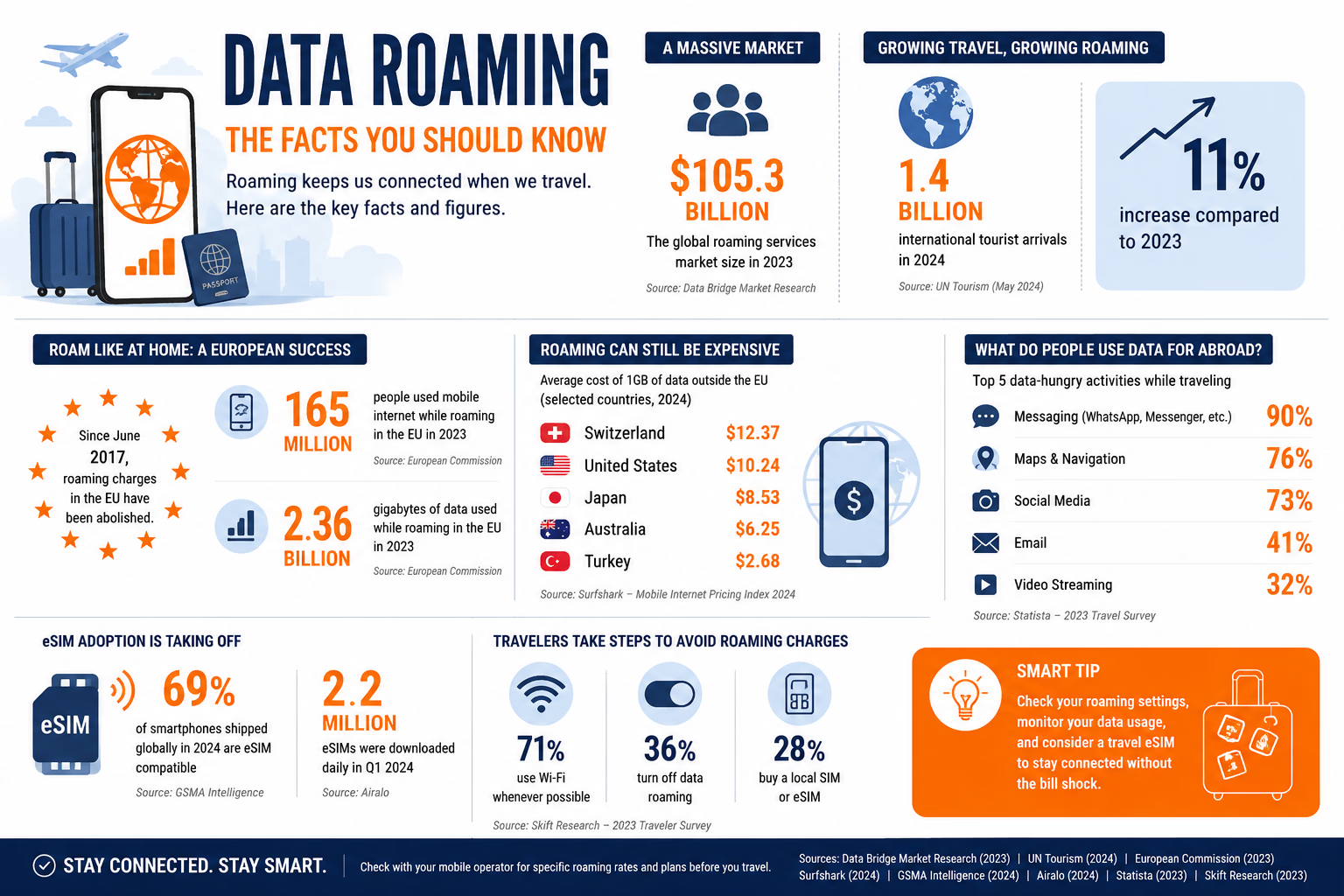 What uses data abroad
Most people think mobile data means “internet browsing”. In reality, almost everything on a smartphone touches the internet.
WhatsApp uses data. Messenger uses data. Google Maps uses data. Email uses data. Instagram, TikTok, YouTube, Spotify, banking apps, airline apps and hotel apps all use data. Even widgets and background services can use data if they are allowed to refresh automatically.
Maps are a classic example. You may open Google Maps only a few times, but navigation, rerouting, traffic updates and location services can all use data. Social apps are another big one. A few short videos or high-resolution photo uploads can burn through a small roaming allowance quickly.
The problem is not one dramatic action. It is the combination.
This is why roaming is less about fear and more about control.
Should data roaming be on or off?
The honest answer: it depends where you are going and what plan you are using.
If you are travelling inside the EU with an EU mobile plan, data roaming can often stay on, as long as you understand your fair-use allowance. If you are travelling outside your included roaming area, it is safer to turn data roaming off until you have a plan.
If you are using a travel eSIM, the answer changes again. Many travel eSIMs require data roaming to be switched on for that specific eSIM line. That does not mean your home SIM should also be roaming. The smart setup is usually this:
Your home SIM stays active for calls or SMS if needed.
Your travel eSIM handles mobile data.
Your home SIM data roaming stays off.
This is where many travellers make mistakes. They buy an eSIM, install it, feel prepared, and then forget to set it as the active mobile data line. The phone may continue using the home SIM for data, and the eSIM just sits there doing nothing useful.
So before you fly, check which SIM is handling data. That one setting matters more than most people realise.

How to reduce roaming costs
The first step is simple: check your operator’s roaming rules before you travel. Do not assume. Some operators include generous roaming, some charge daily passes, some apply country zones, and some destinations are treated as premium roaming locations.
Second, turn off background data for apps you do not need. Social media apps, cloud photo backups and app updates are usually the first suspects. Set app updates to Wi-Fi only. Pause automatic photo and video backups. Download maps, playlists, tickets and hotel details before you leave.
Third, use Wi-Fi carefully. Hotel and airport Wi-Fi can be useful, but it is not always secure or reliable. For banking, work accounts or anything sensitive, a trusted mobile connection or VPN may be smarter than random public Wi-Fi.
Fourth, set data alerts. Most phones let you check mobile data usage. Some let you set warnings or limits. Travel eSIM apps often show remaining data too. This sounds boring, but it works. A quick check once a day can save you from running out at the worst moment.
Fifth, consider a travel eSIM. AP has noted that roaming eSIMs have become a practical way for travellers to avoid high mobile data fees, especially because compatible phones can install plans digitally without swapping a physical SIM card.
That convenience is the real shift. You no longer have to arrive at an airport, queue at a kiosk, compare confusing tourist SIM offers and hope the staff installs it correctly. You can prepare before departure and land with data ready.
Roaming is not the enemy
Roaming gets a bad reputation, but the technology itself is useful. Without roaming, international travel would be far more frustrating. The problem is not that your phone connects abroad. The problem is when you do not know how much that connection costs, which line is being used, or what your apps are doing in the background.
For casual trips inside regulated roaming zones, your home plan may be enough. For longer trips, multi-country routes, business travel or destinations outside your included zone, a travel eSIM or dedicated roaming package often makes more sense.
The best option is not always the cheapest gigabyte. It is the setup that gives you predictable connectivity without turning every map search into a small financial risk.
Conclusion
Data roaming used to be a warning sign. Today, it is more like a setting you need to understand.
The old advice was simple: turn roaming off. That still makes sense in many situations, especially outside your included roaming area. But modern travel is more layered. You may want your home SIM active for verification codes, your travel eSIM active for data, Wi-Fi for heavy downloads, and roaming disabled on the wrong line.
That is the real travel connectivity skill now.
Not avoiding mobile data. Not trusting airport Wi-Fi for everything. Not assuming “EU roaming” or “unlimited” means the same thing everywhere.
The smarter approach is to know before you go: which countries are included, how much data you really have, which SIM is active, and what happens when the allowance runs out.
Because the best roaming experience is not the one you notice. It is the one that quietly works while you enjoy the trip.
Alertify is supported by its audience. When you purchase through links on our site, we may earn an affiliate commission