Managing Your Smartphone’s Heat at the Beach: Essential Tips
A summer beach day looks harmless enough: blue water, a towel, sunglasses, maybe a cold drink, and your smartphone sitting next to you like it belongs there. But from a device point of view, the beach is one of the roughest environments you can put it in.
Heat, direct sunlight, sand, salt air, weak signal, video recording, mobile data, navigation, payments, photos, and charging all collide in one place. That is exactly why phones often slow down, dim the screen, stop charging, shut apps, or show temperature warnings just when you need them most.
This is not just a comfort issue. Apple says iPhones and iPads are designed to operate best in ambient temperatures between 0°C and 35°C, and that using them in very hot conditions can permanently shorten battery life. Google gives similar practical advice for Pixel users: if the phone gets too hot, unplug it, move it somewhere cooler, and stop using it until it cools down. Samsung also advises users to disconnect chargers and close running apps when Galaxy devices become too warm.
The real problem is not only sunlight
Most people blame the sun, and yes, direct sunlight is a major problem. But the bigger issue is combined stress.
Your phone is already generating heat when it uses mobile data, records video, takes photos, runs maps, syncs cloud backups, or searches for signal. Add a hot beach bag, a black phone case, sand blocking airflow, and maybe a power bank charging it at the same time, and the device has very little room to cool itself.
That is why the worst mistake is leaving your phone face-up on a towel while streaming music, taking photos, and charging it. It feels normal. Technically, it is a small heat trap.
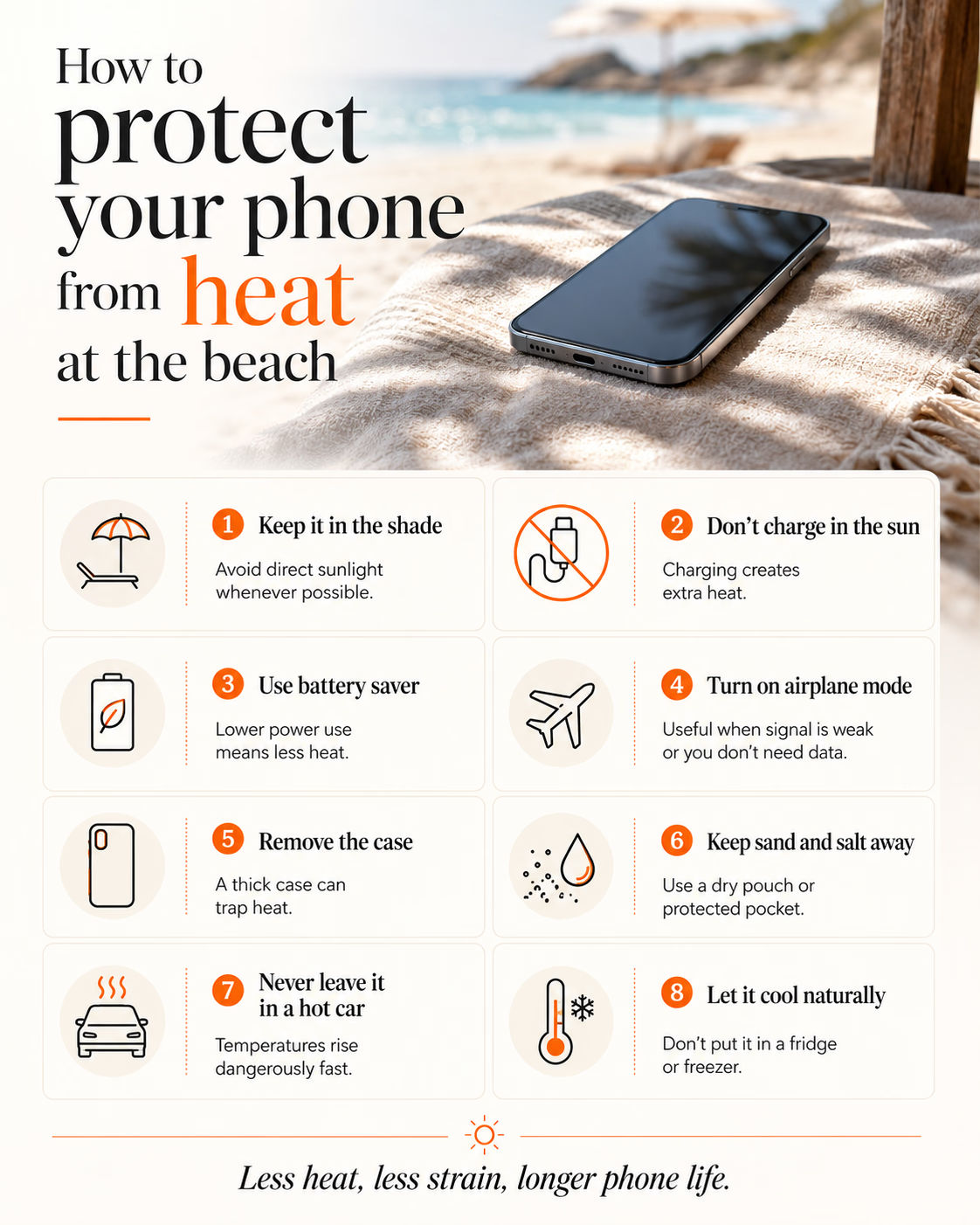
Keep the phone under shade, inside a light-colored bag, under a towel, or in a shaded pocket. Not buried deep in a hot backpack, not pressed against a power bank, and definitely not on a car seat while you “just run in for five minutes.” Parked cars can reach dangerous internal temperatures very quickly, and Apple specifically warns against storing devices outside their recommended temperature range.
Airplane mode is useful when you do not need to be connected for a while, especially if signal is weak. A weak signal forces the phone to work harder to stay connected, which can increase heat and battery drain. If you still need mobile data, turn off background refresh, reduce screen brightness, close navigation and video apps, and avoid long 4K video recording sessions in direct sun.
Battery saver mode is not only for a low battery. On very hot days, it can also reduce background activity and help the phone stay cooler for longer.
Charging deserves extra caution. Charging already creates heat. Charging in direct sun, inside a case, or while using the phone heavily is where problems start. If the device feels hot, stop charging first. Let it cool naturally before plugging it back in.
And no, do not put it in the fridge or freezer. Sudden temperature changes can create condensation, which is a different kind of expensive problem.
Cases, screen protectors and beach myths
A phone case can help against drops, but not every case helps with heat. Thick, rubbery, closed cases can trap warmth, especially when the phone is charging or being used for navigation, hotspot, video, or gaming.
If your phone is already hot, removing the case for a few minutes in the shade can help. A screen protector is useful for scratches and sand, but do not treat it as a cooling tool. The more important protection is behavioral: shade, less workload, no hot charging, and keeping sand away from ports.
Sand is the silent killer here. It gets into charging ports, speaker grills, buttons, and case edges. Avoid placing the phone directly on the towel or sand. Use a small dry pouch or a separate pocket. Salt water is worse. Even water-resistant phones are not “beach-proof” in the way people imagine. Water resistance is tested under controlled conditions, not after months of drops, heat, sunscreen, salt, and sand.
Connectivity makes heat worse
There is also a travel connectivity angle that often gets ignored. Tourists now use their phones harder than ever: eSIM activation, maps, ride-hailing, translation, hotel apps, mobile boarding passes, digital wallets, social video, and hotspot sharing.
This is where better connectivity quietly matters. A phone struggling on poor roaming coverage or constantly jumping between networks can drain faster and warm up sooner. A good travel eSIM or roaming setup will not magically cool your phone, but stable network access reduces one layer of friction. That is increasingly important as travellers depend on their phones as their ID, wallet, camera, map, and emergency contact point all at once.
The market trend is clear: smartphone makers are building more thermal protection into devices, while travel tech brands are making the phone even more central to the trip. The result is a strange contradiction. Phones are more capable, but also more exposed.
Conclusion
The best advice is not “keep your phone hydrated” or buy another accessory. The real lesson is to treat your phone like travel infrastructure, because that is what it has become.
Apple, Google, Samsung, and other manufacturers can build safeguards into the device, but they cannot protect it from every bad habit. If you leave your phone in direct sun, charge it while hot, record videos for twenty minutes, and expect it to run maps and mobile data without complaint, the problem is not the phone being weak. It is the phone being asked to survive a hostile environment.
The winners in travel tech, from smartphone brands to eSIM providers and app developers, will be the ones who design for real travel conditions, not perfect lab conditions. Heat, weak signal, airport stress, beach days, low battery, and constant app usage are not edge cases anymore. They are the normal summer travel experience.