One-Click eSIM Installation: How Installation Links Are Changing the eSIM Experience
For years, eSIMs have promised simplicity. No plastic SIM cards, no waiting for delivery, no fiddling with tiny trays at airport check-in counters. Yet despite all that progress, one part of the eSIM journey has stubbornly remained slightly awkward for many users: installation.

Scanning QR codes, switching between devices, copying activation codes, or emailing yourself screenshots might sound minor, but for travelers who just landed, have low battery, or limited connectivity, those steps matter. This is where installation links, often called one-click or direct eSIM installation, come in.
This new method removes friction from the setup process and brings eSIMs closer to what they were always meant to be: instant, digital, and effortless.
The Traditional eSIM Installation Flow (and Its Friction)
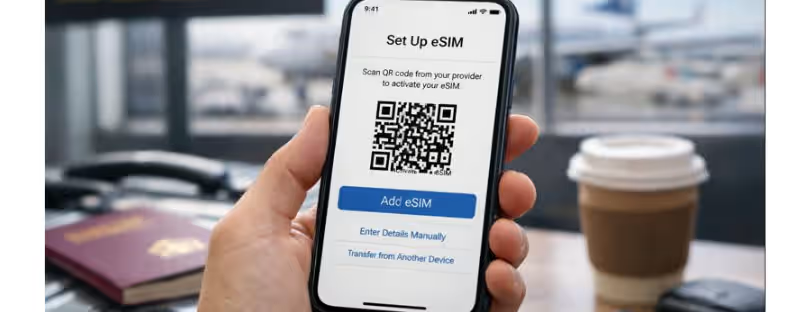
Until recently, most eSIM installations followed a familiar pattern. After purchase, users received a QR code. To install the eSIM, they had to open their phone’s settings, navigate to mobile network options, and scan the code using the device camera.
That works well if:
- You are not already using the same phone to view the QR code
- You have a second screen available
- Your camera works perfectly
- Lighting conditions are good
- You are comfortable navigating system settings
In reality, many travelers purchase eSIMs directly on their phones, especially while on the move. That means juggling tabs, screenshots, or emails, or borrowing another device just to scan a code.
Installation links solve this problem entirely.
What Is an eSIM Installation Link?
An eSIM installation link is a secure activation URL that triggers the eSIM setup process automatically when opened on a compatible device. Instead of scanning anything or entering details manually, the user simply taps a link.
Once opened, the phone’s eSIM manager takes over and starts installing the eSIM profile in the background. From a user perspective, it feels closer to installing an app than configuring telecom settings.
This method is especially powerful for Android users, where QR scanning has historically been less consistent across brands and OS versions.
Why One-Click Installation Matters for Travelers
Travel connectivity is often purchased under time pressure. At the airport, in a taxi, or minutes before boarding. Every extra step increases the chance of frustration, support tickets, or abandoned activations.
One-click installation improves the experience in several ways:
- Faster setup with fewer steps
- No need for a second device
- Lower chance of user error
- Better experience for first-time eSIM users
- Easier activation while already abroad
For eSIM providers, this also means fewer failed installations and less customer support overhead.
Android and the Rise of Direct eSIM Installation
Android has steadily matured its eSIM ecosystem, especially since Android 10. Improvements in the Local Profile Assistant, often referred to as SIM Manager or LPA, have made it possible for providers to trigger installations via secure links instead of QR codes alone.
However, support is still dependent on:
- Android version
- Device manufacturer
- Installed system components
- The app used to open the link
That is why providers introducing installation links typically list clear requirements and supported devices.

KeepGo Introduces One-Tap eSIM Installation on Android
One of the latest providers to roll out this feature is KeepGo, expanding how users can install eSIMs on supported Android devices.
With this update, Android users now have access to direct installation with one tap, removing the need for QR codes or manual input in many cases.
After purchasing an eSIM, users receive an installation link in several places:
- On the payment confirmation page
- In the purchase confirmation email
- Inside the user account under More details → Installation methods for a specific line
Opening this link on the Android device automatically starts the eSIM installation process.
Device and System Requirements You Should Know
While the experience is designed to be simple, there are some important technical requirements to keep in mind.
Direct installation via link is supported on:
- Android 10 or later
- Devices with the latest version of SIM Manager (LPA) installed
- Phones where the link is opened using Google ecosystem apps such as Chrome, Gmail, SMS, and some others
Confirmed device support currently includes:
If the required SIM Manager component is missing or outdated, it can usually be installed or updated through Google Play.

What Happens If Your Device Is Not Supported?
Not every Android phone supports installation links yet. Some manufacturers still rely on older implementations of eSIM management, and support varies by region and firmware version.
In those cases, nothing is lost. The traditional QR code installation method remains available. Users can simply fall back to scanning the code manually and complete the setup the usual way.
This dual-option approach is important. It ensures compatibility while gradually introducing more seamless installation methods where possible.
What This Means for the Future of eSIMs
Installation links are not just a convenience feature. They are a signal of where the eSIM industry is heading.
As eSIM adoption grows among mainstream travelers, not just tech-savvy users, the setup experience must become invisible. Ideally, buying an eSIM should feel no more complex than clicking “Buy” and being instantly connected.
Direct installation brings the industry closer to that goal. It also opens the door to deeper integrations, such as:
- In-app eSIM purchases with instant activation
- Better onboarding flows for first-time users
- Fewer failed activations
- Stronger trust in digital-only connectivity
For travelers, it means less stress. For providers, it means fewer support tickets and higher conversion rates.
Final Thoughts
One-click eSIM installation may sound like a small technical improvement, but in travel tech, small improvements compound quickly. Removing just one or two steps can make the difference between a smooth arrival and a frustrating first hour in a new country.
As more providers adopt installation links and Android support continues to mature, QR codes will slowly become a backup option rather than the default.
If your device supports it, installing an eSIM really can be as simple as tapping a link. And that is exactly how digital connectivity should feel.