Using Two eSIMs at the Same Time: Why It’s Useful and How to Set It Up
If you’re a frequent traveler, a digital nomad, or simply someone who juggles work and personal life across different numbers, you’ve probably wondered whether it’s possible to use two eSIMs simultaneously on one device. The short answer: yes—if your phone supports dual eSIM. The longer answer is a bit more interesting, because dual eSIM isn’t just a convenience feature anymore; for many travelers, it’s the difference between staying connected smoothly and running into a mess of roaming charges and coverage gaps.

Dual eSIM is one of those features that quietly transforms the way you use your smartphone. Once you try it, you wonder how you ever traveled without it. But before we get into the how-to, let’s break down the why.
Why Would Anyone Need Two eSIMs?
There are a few genuinely useful scenarios where running two eSIMs at once makes life easier:
You want two phone numbers on one device
Maybe you’re carrying a personal number and a work number. Or you want to keep your home number active for banking codes and WhatsApp while traveling. Dual eSIM lets you do that without swapping physical SIMs or carrying a second phone.
You need coverage across different networks
No single operator delivers perfect coverage everywhere, especially when you travel internationally. Running two eSIMs from two different carriers allows your device to switch or manually choose whichever network performs better.
You like optimizing costs
One eSIM might be perfect for cheap data. Another might offer local minutes or better roaming rates. Travelers who love squeezing maximum value out of their connectivity almost always go dual.
You want flexibility without the hassle
Physical SIM swapping is old-school. eSIMs are instant, digital, and clean. Using two at once just doubles the convenience.

So dual eSIM isn’t a gimmick—it’s a practical tool, especially for people who move across countries, borders, and networks.
Step 1: Check Whether Your Device Supports Dual eSIM
Now for the catch: not every device supports using two eSIMs at the same time. Some phones allow one physical SIM + one eSIM. Others allow two eSIMs but only one active at a time. And then there are the champions—devices that support two active eSIM profiles running simultaneously.
To check whether your phone can handle dual eSIM:
- Look at your phone’s official specifications
- Search your device model online with “dual eSIM support”
- Check the device manual or support page
- Go to Settings → SIM / Mobile Network → Add eSIM (if it shows the ability to add multiple eSIM profiles, that’s a good sign)
iPhones generally have the best dual eSIM support. Most recent models support two active eSIMs.
Android phones, however, vary widely. Some Samsung, Google Pixel, Motorola, and Xiaomi devices support dual eSIM, while others do not.
If your device doesn’t support dual eSIM, unfortunately, there’s no workaround—you won’t be able to run two eSIMs simultaneously.
Step 2: Activate Your Two eSIMs
Once you’ve confirmed compatibility, it’s time to activate the two eSIMs. The process is simple:
- Purchase your eSIM plans from your chosen providers
- Open Settings on your device
- Find the option to add a new eSIM
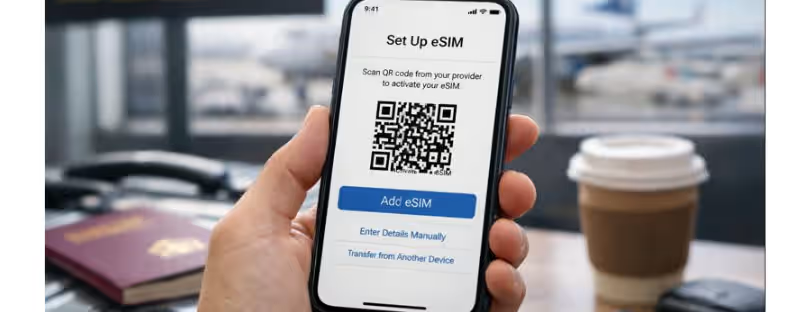
- Scan the QR code provided by your carrier or paste the activation code
- Repeat the same process for the second eSIM
Most activation processes take under two minutes. Once installed, you’ll see both connections listed separately.
This is also a great moment to mention that Airhub is one of the providers that makes eSIM activation incredibly smooth. Their QR codes activate almost instantly, and their dashboard lets you manage your eSIM plans without the usual headaches. Airhub also offers a wide selection of regional and global plans—perfect if your second eSIM needs to work across several countries or if you’re optimizing for a better network in a specific region.
Step 3: Set Up Dual eSIM in Your Device Settings
Once both eSIMs are installed, your device will ask you how you want to label them—work, personal, travel, or custom names. This is more helpful than it sounds. When you’re switching between networks, it’s much easier to tap “Travel eSIM” than some random carrier name you barely recognize.
Then head into your SIM or Mobile Network settings. Here you’ll see specific options for dual SIM or dual eSIM management, such as:
- Selecting which eSIM handles mobile data
- Choosing a default line for calls and SMS
- Setting whether your phone should ask which SIM to use each time you make a call
- Checking roaming preferences
- Enabling or disabling one eSIM at a time
The exact menus differ from device to device, but the functionality is mostly the same everywhere.
Step 4: Pick Your Default SIM for Calls, Messages, and Data
Now comes the configuration part. Your phone needs to know which eSIM to use by default for essential tasks:
- Mobile data: Most travelers assign this to their travel eSIM.
- Voice calls: You can pick a default or tell your device to ask every time.
- SMS: Works the same as calls—your phone needs a default line.
This setup lets your phone behave the way you want while still keeping the second eSIM active in the background.
A common setup for travelers looks like this:
- Primary line: Home number (keeps WhatsApp and bank codes working)
- Travel line: Data eSIM from Airhub or another provider
This combination gives you the best of both worlds: always reachable on your main number, but never paying ridiculous roaming fees for data.
Step 5: Make Sure Both eSIMs Are Active and Have Signal
Once everything is configured, check your signal bars. You should see two separate signals—one for each eSIM. If one shows “no service,” try toggling it off and on again.
Signal strength matters even if you’re not actively using that eSIM. For example, if your home number is on one eSIM, it needs to stay connected so that SMS verification codes and calls can still find you.

Does Using Two eSIMs Affect Battery Life?
Yes—but not dramatically. Running two active network connections uses more power than running one. If you travel through areas with a weak signal, your phone will work harder to maintain both connections, which can also drain the battery faster.
That said, for most users, the trade-off is absolutely worth it. A slightly lower battery percentage is a fair exchange for avoiding roaming disasters or juggling two phones.
Network Performance: What to Expect
Can having two eSIMs slow down your network performance? Possibly, but usually only in very specific situations—like when both connections are actively being used for calls, switching networks frequently, or when you are in an area with congested cell towers.
Most devices prioritize the eSIM you selected for data, so things stay smooth.
Final Thoughts: Dual eSIM Makes Travel and Work a Whole Lot Easier
Dual eSIM functionality is one of those features people underestimate until they start using it. Whether you’re traveling across borders, carrying separate work and personal numbers, or optimizing for better coverage, running two eSIMs at once gives you flexibility that wasn’t possible a few years ago.
Providers like Airhub make this even easier with fast activation, reliable coverage, and plans that work across multiple countries—making them an excellent choice when you’re setting up your second eSIM for travel.
If your device supports it, give dual eSIM a try. It’s simple, efficient, and genuinely useful—especially for anyone who lives life on the move.