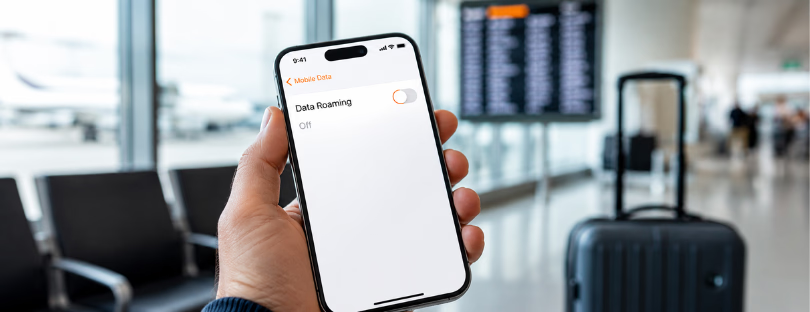
How to turn off data roaming before it turns expensive
Roaming is one of those mobile settings most people ignore until the bill arrives.
In simple terms, roaming happens when your phone connects to another operator’s network because your usual mobile network is not available. That can happen abroad, but in some cases it can also happen nationally, depending on how your operator’s coverage agreements work.
There are two main types to understand. Voice roaming lets you make and receive calls through another network. Data roaming lets your phone use mobile internet through another network. The second one is usually where the trouble starts, because apps can quietly use data in the background even when you are not actively using your phone.
Email syncing. Maps. Cloud backups. WhatsApp media. App updates. Weather widgets. All of these can use mobile data without asking you every five minutes. If data roaming is switched on while you are outside your normal network area, those small background actions can become very expensive.
Inside the EU, roaming is much safer than it used to be. Since “Roam Like at Home” rules came into force, travellers can generally use calls, texts and data in other EU countries under domestic-style conditions, although fair-use limits still apply. The European Commission notes that operators may apply fair-use policies, especially for heavy data use or certain plans. Outside the EU, roaming is a very different story and can still be costly fast.
Before you switch it off
Turning off data roaming does not disable your phone. You can still use Wi-Fi. You can still receive SMS in many cases. You can still connect to airport, hotel, café or home networks.
What it does is stop your phone from using mobile data when connected to a roaming network. That is useful when you want to avoid surprise charges, especially outside the EU, on cruises, near borders, or when travelling with a plan that has unclear roaming rules.
It is also smart to check which SIM or eSIM line is using data. Many travellers now keep their home SIM active for calls and SMS while using a travel eSIM for mobile data. In that case, you do not just want to turn roaming off blindly. You want the right line using data, and the wrong line blocked from roaming.
Android
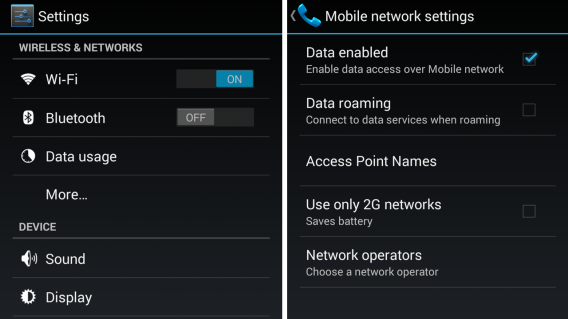
On most Android phones, open Settings, then go to Network & internet, SIMs, and select the SIM or eSIM you want to manage. From there, switch Roaming off. Google’s own Pixel guidance gives the same basic route: Settings, Network & internet, SIMs, then turn Roaming off.
The wording may vary depending on the device. Samsung, Xiaomi, OnePlus, Honor and other Android brands often rename menus slightly. You may see Mobile network, Connections, SIM manager, Data roaming, or Roaming data instead.
The idea is the same: find the SIM or eSIM profile, open mobile network settings, and disable data roaming.
One useful extra step: check Mobile data or Preferred SIM for mobile data. If you are using a travel eSIM, make sure mobile data is assigned to that travel eSIM, not your home number.
iPhone and iPad
On iPhone, open Settings, tap Cellular or Mobile Data, then choose Cellular Data Options or Mobile Data Options. From there, turn Data Roaming off.
Apple’s support guidance also notes that users with a single SIM or eSIM can go to Cellular or Cellular Data, turn on Cellular Data, then open Cellular Data Options to manage Data Roaming settings.
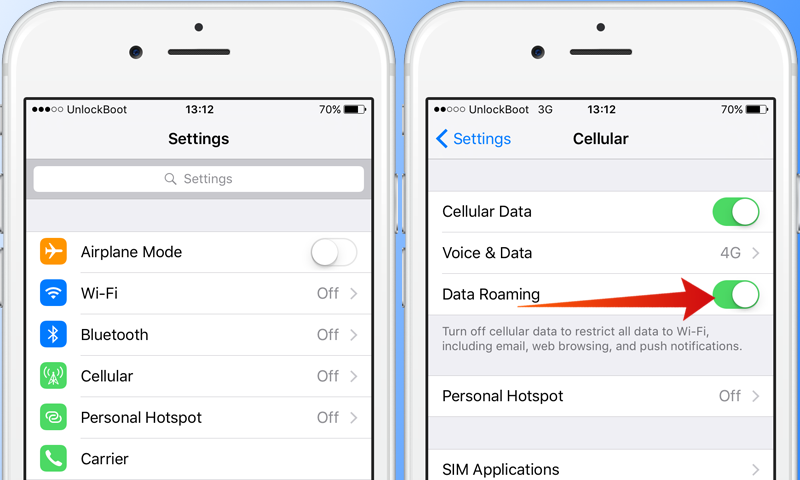
If you use Dual SIM or multiple eSIMs, pay attention to which line you are editing. Go to Settings, then Cellular, and check which line is selected for Cellular Data. Your home line and travel eSIM may have separate roaming settings.
This matters because many travellers accidentally leave their home SIM active for data while assuming the travel eSIM is doing the work. That is exactly how “I bought an eSIM, why did I still get charged?” stories happen.
Windows Mobile
Older Windows Mobile guides often included this instruction: choose “Do not connect roaming” from the data roaming menu.
That may still be useful for someone using an old Lumia or Windows phone as a secondary device, but it should be treated as legacy advice. Microsoft ended support for Windows 10 Mobile, and version 1709 was the final release.
If you still use one, the usual path is Settings, Network & wireless, Cellular & SIM, then look for data roaming options and choose “Do not connect roaming.”
For modern travellers, however, this is no longer the mainstream issue. The real focus today is Android, iOS, tablets, laptops with cellular support, and eSIM-enabled devices.
What turning off roaming does not solve
Disabling data roaming protects you from one category of surprise cost, but it does not automatically create a good travel connectivity setup.
You still need a plan. That might be your operator’s travel pass, a local SIM, or a travel eSIM. You also need to check whether your phone is unlocked, whether your eSIM works in the country you are visiting, and whether tethering or hotspot use is allowed.
Also remember that “unlimited” is not always unlimited in the way travellers imagine. Some plans slow down after a certain amount of data. Some include fair-use limits. Some countries are excluded from regional packages. And some operators treat cruise ships, ferries, satellite networks and border zones very differently from normal land-based roaming.
That is why the best approach is not just “turn roaming off.” It is: know which line is active, know which plan is handling data, and know what happens when that plan runs out.
Conclusion
Roaming used to be a simple warning: turn it off or pay the price. Today, it is a little more nuanced.
In the EU, roaming rules have made everyday travel much safer for mobile users, although fair-use limits still matter. Outside the EU, roaming can still be brutally expensive, especially if your phone quietly updates apps, syncs photos, or connects in the background. That is where disabling data roaming remains one of the simplest and most effective travel habits.
But the bigger shift is eSIM. Instead of relying on your home operator and hoping the roaming rate is acceptable, travellers now have more control. You can keep your main number active, move data to a travel eSIM, and avoid using your home SIM for expensive mobile internet abroad.
So yes, turn off roaming when you need to. But more importantly, build a smarter setup before you travel. The real win is not just avoiding charges. It is knowing exactly which network, which SIM, and which plan is carrying your trip.


Alertify is supported by its audience. When you purchase through links on our site, we may earn an affiliate commission – How to disable roaming