Are You Getting the Internet Speed You’re Paying For?
An internet speed test is one of the quickest ways to understand how well your connection is actually performing.
It measures how fast data moves between your device and the internet. More importantly, it helps you see whether your connection is strong enough for the things people do every day: streaming, video calls, gaming, remote work, cloud apps, smart home devices and large downloads.
Most people only run a speed test when something feels wrong. A video keeps buffering. A Zoom call freezes. A website loads like it is stuck in 2007. But speed testing is useful even when your internet seems fine, because it gives you a real performance snapshot instead of relying on what your internet service provider promised on paper.
The result is not just a number. It is a useful signal.
Why Run an Internet Speed Test?
Your internet plan may advertise “up to” a certain speed, but the speed you experience at home can be very different. That is why running an internet speed test from time to time is a smart habit.
It helps you check whether you are getting close to the speeds you pay for. If your plan promises 300 Mbps but you regularly see 40 Mbps under normal conditions, something is not right.
It also helps you troubleshoot slow internet. The issue may not always be your provider. It could be your router, WiFi signal, device, outdated equipment, network congestion or even too many devices using bandwidth at the same time.
A speed test can also show where your connection is strongest. Testing near the router, in the bedroom, in the office and in other rooms can reveal WiFi dead zones. This is especially useful in larger homes, older buildings or apartments with thick walls.
It is also worth testing wired and wireless connections separately. A laptop connected by Ethernet will usually perform better than the same laptop on WiFi. If the wired connection is fast but WiFi is slow, the problem is probably inside your home network, not with the internet line itself.
Regular testing gives you a baseline. Once you know what “normal” looks like, it becomes much easier to spot when performance drops.
How an Internet Speed Test Works
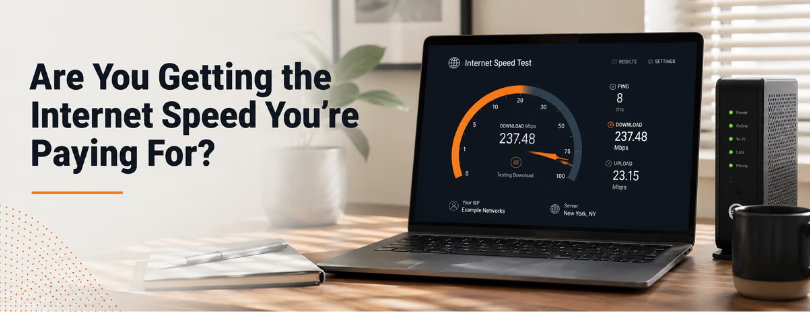
An internet speed test usually measures three things: download speed, upload speed and latency.
Download speed shows how quickly your device receives data from the internet. This affects streaming, browsing, downloading files, loading websites and using apps. It is usually the number people care about most because it impacts many common online activities.
Upload speed shows how quickly your device sends data to the internet. This matters when you upload videos, send large files, back up photos, use cloud storage, join video calls or livestream. Many internet plans offer lower upload speeds than download speeds, so this number is worth checking carefully.
Latency, often called ping, measures how long it takes for data to travel from your device to a server and back. It is measured in milliseconds. Lower latency means a more responsive connection. This is especially important for online gaming, video calls, remote desktops and anything happening in real time.
During the test, your device connects to a server, downloads and uploads small packets of data, and calculates how quickly that data moves. The result gives you an estimate of your connection’s current performance.
The keyword is current. Speed test results can change depending on the time of day, the server used, your device, your router, WiFi conditions and how many people are online.

What Affects Internet Speed?
Internet speed is not controlled by one factor. It is the result of several things working together, and sometimes working against each other.
Network congestion is one of the most common reasons speeds drop. During peak hours, especially in the evening, more people in your area are streaming, gaming, downloading and browsing. If the network is busy, speeds can slow down.
Distance also matters. The farther your data has to travel to reach a server, the longer the response time. This is why a speed test to a nearby server may show better results than one to a server in another country.
WiFi can also reduce performance. It is convenient, but it is affected by walls, furniture, distance, interference and router placement. A wired Ethernet connection is usually more stable and faster.
Your device can be part of the problem too. Older phones, laptops or tablets may have weaker WiFi hardware and may not support newer standards. Even if your internet plan is fast, an older device may not be able to use the full speed.
Router quality makes a big difference. An outdated router can become a bottleneck, especially if you have many connected devices. Smart TVs, phones, laptops, tablets, cameras, speakers and gaming consoles all compete for bandwidth.
There may also be issues with cables, wiring or the provider’s network. Damaged lines, loose connections or local outages can all affect your speed.
And sometimes the problem is software. Malware, background downloads, cloud backups, operating system updates or open apps can quietly consume bandwidth while you are testing.
How to Run a More Accurate Speed Test
A speed test is only useful if you run it properly. Otherwise, the result can be misleading.
For the most accurate result, use a wired Ethernet connection whenever possible. This removes WiFi interference from the test and gives you a clearer picture of the actual connection coming into your home or office.
Close unnecessary apps, browser tabs and downloads before testing. Streaming video, cloud backups, game updates and file transfers can all affect the result.
Run more than one test. A single result does not tell the whole story. Test at different times of day, especially during peak evening hours and quieter periods in the morning or afternoon.
Use the same speed test tool and server when comparing results over time. Changing servers can change the outcome, so consistency matters.
Restart your modem and router before testing if your connection has been unstable. This can clear temporary issues and refresh the connection.
Also test in different rooms if you are measuring WiFi performance. A strong result next to the router and a weak result in your office tells you the issue is probably WiFi coverage, not the internet plan itself.


Best Internet Speed Test Tools
There are several reliable tools you can use to run an internet speed test.
Speedtest by Ookla is one of the most widely used options. It measures download speed, upload speed and ping, and lets you choose different servers.
Fast.com is a simple tool from Netflix. It is especially useful if you want a quick idea of how your connection performs for streaming.
Measurement Lab, also known as M-Lab, is an open-source testing platform that provides more technical network performance data.
Many internet providers also offer their own speed test tools. These can be useful, but it is smart to compare the results with independent tools as well. Provider-hosted tests may show how your connection performs inside their own network, while independent tests may give a broader view of real-world performance.
The best approach is simple: use two or three trusted tools and compare the results. If all of them show similar speeds, the result is probably reliable.
Understanding Your Speed Test Results
Speed test results can look simple, but they need context.
Download speed is usually the biggest number. For basic browsing and email, you do not need much. For HD streaming, video calls, cloud work and multiple devices, you need more.
Upload speed is often overlooked, but it matters more than people think. If you work from home, send large files, create content, back up data or use video conferencing often, poor upload speed can become frustrating very quickly.
Latency is just as important as speed in some situations. You can have a fast download speed and still experience lag if latency is high. For gaming, live video calls and remote work tools, lower latency often feels better than just having a bigger Mbps number.
A good result depends on your usage. A single person browsing and streaming occasionally does not need the same speed as a family with multiple smart TVs, remote workers, gamers and connected devices.
As a general rule, 25 to 50 Mbps can be enough for basic modern use, but busier households usually benefit from 100 Mbps or more. For heavy streaming, gaming, remote work and many connected devices, higher speeds provide more breathing room.
What Internet Speed Do You Actually Need?
The right internet speed depends on how you use your connection.
For basic browsing, email and social media, even modest speeds can work well.
For HD streaming, aim for at least 25 Mbps per household, and more if several people stream at the same time.
For 4K streaming, faster speeds are better. A single 4K stream can work at around 25 Mbps, but multiple 4K streams need much more capacity.
For video calls, download and upload speeds both matter. A stable 10 to 25 Mbps connection is usually enough for regular video meetings, but remote workers should have extra bandwidth for file sharing, cloud apps and multiple devices.
For online gaming, latency matters more than raw speed. You do not necessarily need hundreds of Mbps for gaming, but you do need a stable connection with low ping.
For larger households, the number of connected devices is often the real issue. A plan that works for one person may struggle when four people are streaming, gaming, working and scrolling at the same time.

How to Improve Slow Internet
If your internet speed test results are lower than expected, do not upgrade your plan immediately. First, check the basics.
Restart your modem and router. It sounds simple, but it often helps.
Move closer to the router and test again. If the result improves dramatically, your WiFi coverage is the issue.
Try a wired Ethernet connection. If Ethernet is much faster than WiFi, your internet line may be fine, but your wireless setup needs work.
Check whether other devices are using bandwidth. Game downloads, cloud backups, streaming and software updates can slow the connection for everyone.
Update your router firmware and device software. Older software can affect performance and security.
Place your router in a better location. Keep it away from thick walls, metal objects, microwaves and hidden corners. A central, open position usually works best.
Scan for malware if one device is unusually slow. Sometimes the issue is not the internet connection, but the device itself.
If your home is large or has poor WiFi coverage, consider a mesh WiFi system instead of relying on one router.
If speeds remain poor across multiple devices, at different times of day, and especially on Ethernet, then it may be time to contact your internet provider.
When Should You Upgrade Your Internet Plan?
An upgrade makes sense when your current plan no longer matches your usage.
If you frequently experience buffering, frozen video calls, slow downloads or lag while several devices are connected, your household may need more bandwidth.
If you recently added smart TVs, gaming consoles, security cameras, smart home devices or more remote work activity, your old plan may no longer be enough.
If your speed test results are consistently close to your plan’s maximum but the connection still feels slow, you may simply be outgrowing the plan.
But if your results are far below the advertised speed, upgrading should not be your first move. In that case, ask your provider to investigate. You should not have to pay for a faster plan just to receive the performance you were already promised.
Conclusion about Internet Speed Test
An internet speed test is not just a quick number on a screen. It is one of the simplest ways to understand the real quality of your connection.
Used properly, it can show whether your internet provider is delivering what you pay for, whether your WiFi setup is holding you back, and whether your household needs more bandwidth. It can also help you avoid unnecessary upgrades by identifying problems that can be fixed with better router placement, updated equipment or a wired connection.
The smartest approach is not to test once and panic. Test consistently. Test under different conditions. Compare WiFi and Ethernet. Look at download speed, upload speed and latency together.
That is how an internet speed test becomes genuinely useful. Not as a random troubleshooting tool, but as a regular check-up for one of the most important services in your home or business.