Huawei Smartphones & eSIM
Huawei and eSIM should be a simple story by now. It is not. And that is exactly why this guide exists.
eSIM is one of the most practical travel features a phone can have. You land in another country, install a local or regional data plan, keep your regular number active, and avoid searching for a plastic SIM card. For frequent travellers, that small detail can save time and stress.
With Huawei phones, however, there is one important warning: do not assume every premium Huawei model supports eSIM. Some do. Some do not. Some support it only in specific regional versions. That makes Huawei different from Apple, Samsung, and Google Pixel, where eSIM support is usually easier to explain.
Huawei’s older eSIM story was built around Huawei P40, Huawei P40 Pro, and Huawei Mate 40 Pro. Newer Pura and Mate models are bringing eSIM back into the conversation, especially in dual SIM versions where one nano SIM can be used with either another nano SIM or one eSIM. Still, check your exact model number before buying an eSIM plan.
Huawei eSIM phone models
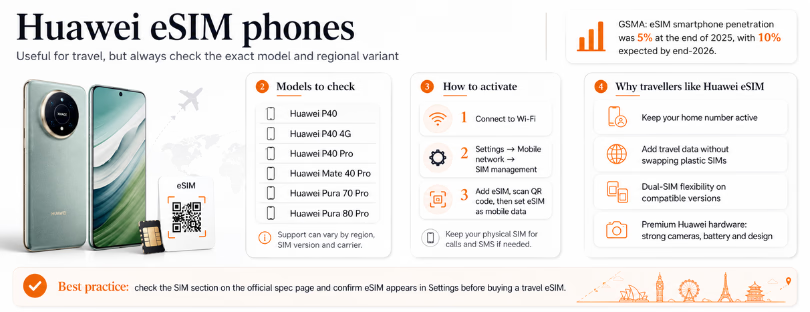
The Huawei phones most commonly associated with eSIM support are:
The older, safest reference points are Huawei P40, P40 Pro, and Mate 40 Pro. One important note: Huawei P40 Pro+ should not be grouped together with P40 Pro. It is regularly listed as not supporting eSIM.
The newer models are more interesting, but more region-dependent. Huawei’s regional specification pages for phones such as Pura 80 Pro and Mate X7 describe dual SIM versions that can support one nano SIM plus either one nano SIM or one eSIM. That is the setup many travellers want: keep the home SIM active and add an eSIM for data abroad.
This is where Huawei needs to do better. Compatibility should not feel like detective work. If you are buying a Huawei phone mainly for travel connectivity, do not rely only on the product name. Check the SIM section in the official specification page for your country, then confirm inside the phone settings.

How to activate eSIM
Before activation, make sure three things are true. Your Huawei phone must support eSIM, it must be unlocked, and you need a valid eSIM plan from your mobile operator or travel eSIM provider.
Connect the phone to Wi-Fi. The eSIM profile has to download before it can connect to mobile data.
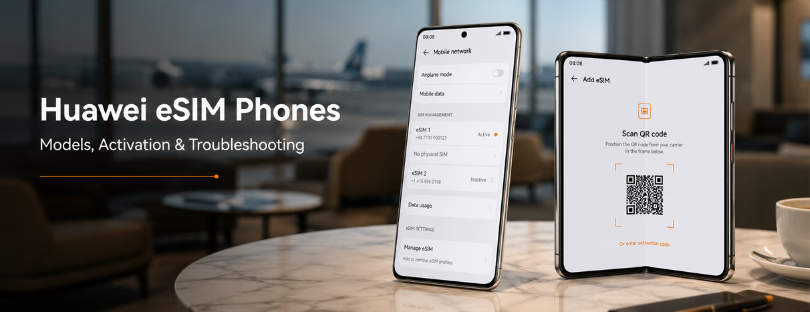
On most Huawei phones, the route looks like this: open Settings, go to Mobile network, then SIM management. If your model supports eSIM, you should see an option to add or manage an eSIM, usually beside SIM 2.
Choose Add eSIM. The phone will ask you to scan a QR code or enter activation details manually. Most travel eSIM providers send a QR code by email or show it inside their app. Scan the code, follow the instructions, and wait until the profile installs.
Once installed, give the eSIM a clear name, such as “Japan data” or “Europe trip.” Then choose which SIM handles mobile data. For most travellers, the best setup is simple: keep the physical SIM for calls and SMS, and set the eSIM as the mobile data line. WhatsApp, maps, banking apps and email then work without touching your home number.
Some eSIMs activate when installed, while others activate only when they first connect to a supported network. That rule comes from the provider, not Huawei. Always check before scanning the QR code.
Possible troubleshooting
If the eSIM menu does not appear, the phone variant may not support eSIM, the software may be outdated, or the feature may not be available in that region. Update the phone, restart it, and check SIM management again. If the option is still missing, your version probably does not support eSIM.
If the QR code will not scan, increase screen brightness on the device showing the code, clean the camera lens, and avoid scanning from a cracked or dim screen. If it still fails, use manual activation details if your provider offers them.
If the eSIM is active but there is no data, check that the eSIM is selected for mobile data. Then turn on data roaming if the provider requires it. Travel eSIMs often need roaming enabled because they connect through partner networks abroad.
If data still does not work, check the APN settings. Some providers configure APN automatically, but not all of them do. If your provider gives a specific APN, enter it exactly.
Do not delete the eSIM too early. Many profiles can be installed only once. If you delete it during the trip, you may need customer support or a replacement QR code.
Finally, remember that eSIM does not fix poor coverage. If the provider has weak partner networks in your destination, your Huawei phone cannot magically solve that.
 The real takeaway
Huawei eSIM phones are useful, but they are not the easiest eSIM category on the market. Apple has the cleanest consumer story. Samsung has broad support across many premium and mid-range devices. Google Pixel is usually straightforward for travellers who want simple setup.
Huawei is different. It is attractive for people who like Huawei hardware, strong cameras, big batteries, and premium Mate or Pura design. It is less ideal for someone who wants zero research before buying a travel eSIM.
That does not make Huawei a bad choice. It makes it a choice for users who check details. If you already own a compatible Huawei phone, eSIM can be excellent for travel. If you are buying a phone mainly for eSIM convenience, compare carefully with iPhone, Samsung Galaxy, and Google Pixel before deciding.
The wider trend is clear: eSIM is becoming a normal part of premium smartphones, not a niche feature. Huawei is part of that shift, but it still needs clearer compatibility messaging. Until then, the smartest Huawei traveller is the one who checks the exact model before the trip, installs the eSIM on Wi-Fi, and tests the settings early.